
Start with the right details.
Keep customer enquiries, contacts and job notes together before the work begins.
For service businesses · In pilot development
Connect customer enquiries, office planning, field work and invoices in one place.
CentralOS brings office coordination on Mac together with assigned work on your team’s phones.
Explore a moving company demo. No sign-in needed.
A more connected working day
Every enquiry starts a chain of work. CentralOS keeps the details close as the job moves between your office, your team and your customer.
Keep customer enquiries, contacts and job notes together before the work begins.
Let office planning and assigned field work follow the same job.
Bring the work back into invoice review, payment activity and completed records.
The CentralOS workflow
From the first enquiry to the final record—office and field working from the same job.
Capture the incoming enquiry in Front Desk, with the customer’s details close at hand.
An example workflow. Tools and access vary by company setup and staff role.
Explore the workspace
Choose a part of the working day to explore the actual CentralOS interface.
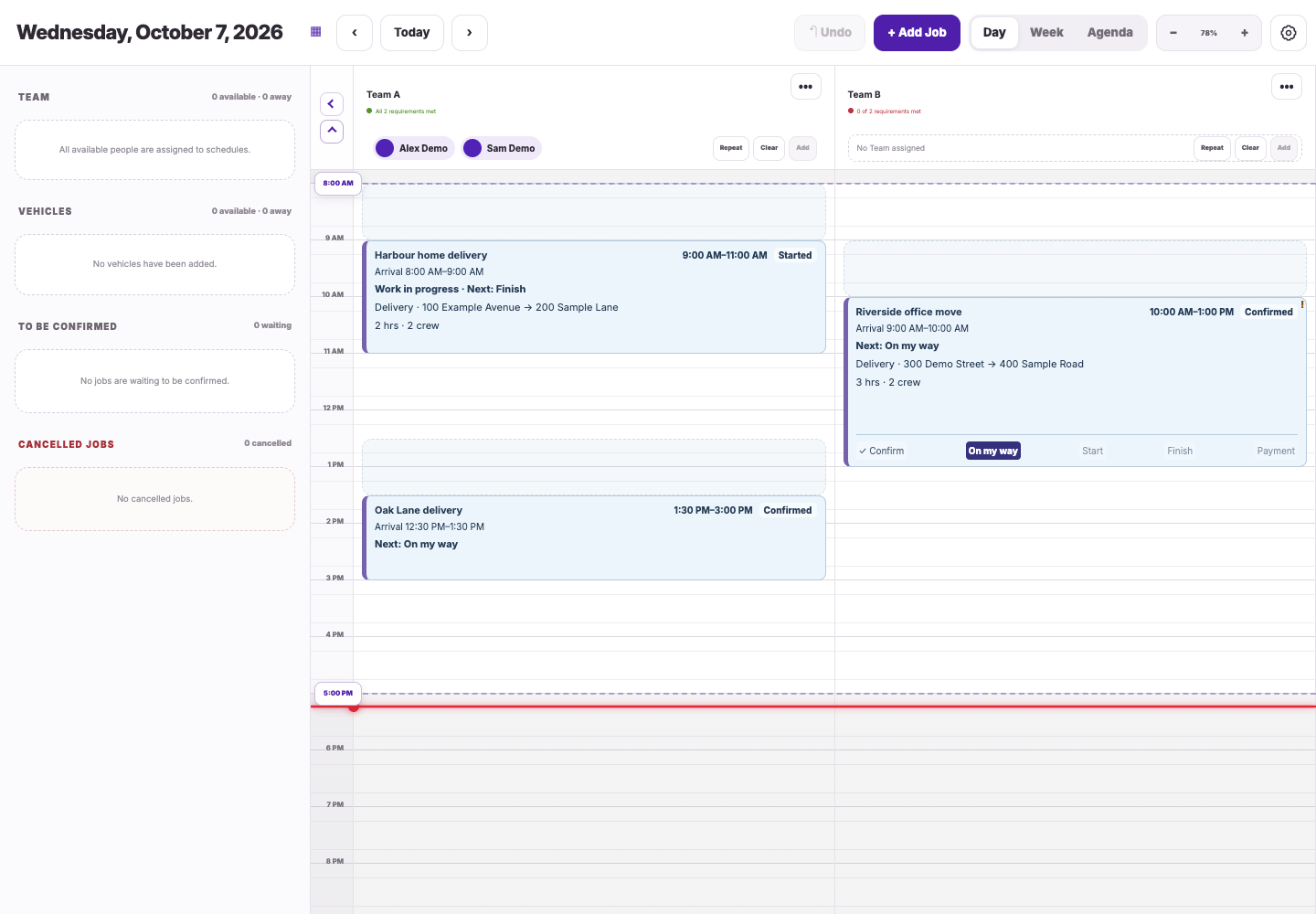
Bring enquiries, customer details and estimates into the office plan, then schedule the appointment and team.
Bring customer emails and company guidance into the office’s Front Desk workspace.
Coordinate appointments and team assignments. Move between day and week views as the plan changes.
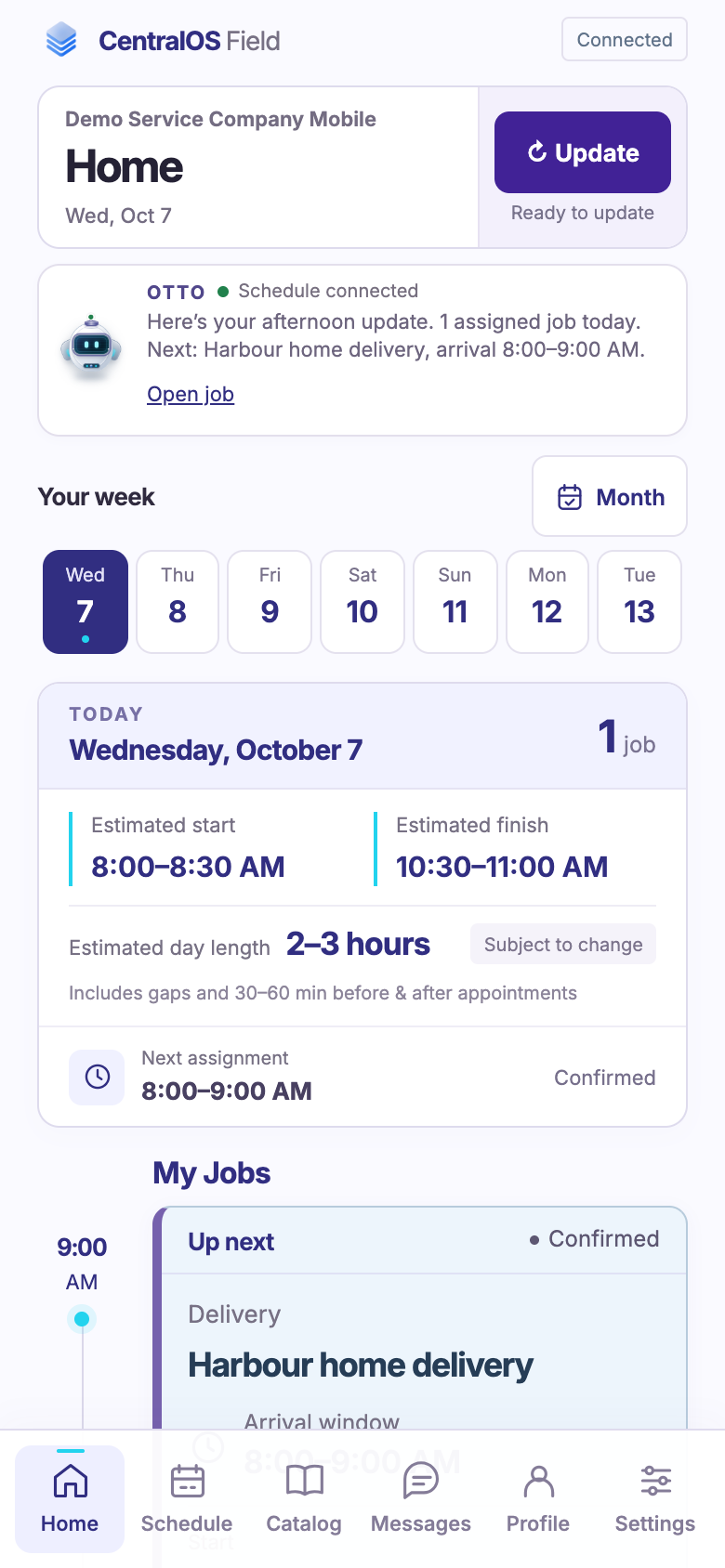
Keep assigned work and office communications close to the people doing the job.
Staff see assigned jobs, customer details and work updates on their phones. Roles and permissions shape each person’s access.
Keep office messages and work updates available to the team, alongside the jobs they’re handling.
Prepare the customer document, follow payment activity and review completed work.
Prepare service lines, preview the customer document and decide when to issue or send the invoice.
Review invoice and payment activity alongside the work. Supported payment actions depend on your company’s setup.
Bring business activity into the Reports workspace to help your office review the work and its records.
Actual CentralOS screens · Fictional demo records. Open a preview to see more detail.
Connected services
Bring customer conversations and invoice payments into the same working day.

Connect your Google mailbox to the Front Desk and keep enquiries, replies and office follow-up together.
Business address? Google Workspace is supported. Outlook, Hotmail, Yahoo and other providers are not available yet.
 Payments integration
Connect your company’s Stripe account to create secure invoice payment links and follow payment activity in CentralOS.
Live payments require a connected Stripe account with payments enabled. Access depends on company setup and staff role.
Office & field
Use the workspace that fits the work, with access shaped by your company’s roles and permissions.
Manage customers, estimates, scheduling, email, invoices and reports from the office.
Follow assigned jobs, find customer and job details, and stay connected to office messages and work updates.
Built through real work
CentralOS is being developed and tested through day-to-day work at Hour Movers. Real appointments, team coordination and office follow-up help shape the product as it grows.
Pilot access is by invitation. We welcome conversations with service businesses about the way their office and field teams work.
Meet Hour Movers ↗Downloads
Get the Mac app, or open CentralOS on your phone.
Scheduling, customer records, email, invoices and payments in the Mac app.
Download for MacmacOS 12+ · Intel build · Apple silicon requires Rosetta
Enter the beta download password, download and unzip the file, then move CentralOS.app to Applications. Install Version 758 once to enable future updates inside CentralOS. In Settings, choose Check for updates. Enter the beta download password once to enable protected downloads.
This pilot build is not Apple-notarized. If macOS blocks its first launch, use System Settings → Privacy & Security → Open Anyway for the CentralOS app you downloaded here.
Windows downloads are not available yet.
Use your own CentralOS account to sign in. New versions can download in CentralOS. Choose Update and restart after saving and closing your editors; Later lets you keep working.
Release notes & download verificationDownload CentralOS for Android or update your existing app. Version 0.2.0 adds phone notifications.
Download / Update for AndroidAlready installed? Open the download and tap Update. No uninstall needed.
Android 8.0+ · Internet connection required
Open CentralOSTap Download / Update for Android, then open CentralOS-Android-2.apk from your downloads. If Android asks, allow Chrome to install apps from this source, return to the downloaded file and tap Install.
Once installed, open CentralOS from its app icon and sign in. This APK does not require Chrome’s Add to Home screen option. To update the Android app, download and install the newer APK over the existing app.
Open CentralOS in Safari → Share → Add to Home Screen → Add. Then open the new icon and sign in.
In the Android app, open Settings → Enable phone notifications, allow notifications when prompted, then tap Send test notification. Alerts can appear while the app is closed, with an app-icon dot or badge on supported phone launchers. For the browser-installed phone app, use the same Settings options. On iPhone, browser-app notifications require the installed home-screen app and iOS 16.4 or later.
The Android app loads the latest CentralOS interface while connected. Android package updates use a fresh download. Android release notes & download verification
Pilot access is by invitation. Use your own invited account to sign in.
Get in touch
Talk with Joseph Nemeth about your team, your workflow and pilot access.
This public information page has no sign-up form, checkout or advertising trackers added by CentralOS. The hosting provider may process connection and technical information to deliver and protect the website.
This page does not ask you to submit personal information. For questions about this website, call +1 (250) 920-6092. Do not share passwords or payment-card details when making a general support enquiry.
Links to Hour Movers and other services take you to separate websites with their own policies. This notice describes this information page, not the private CentralOS staff workspace.
No software purchase or subscription is offered through this website. Contact the team for the terms of any pilot invitation before joining. Any future paid offering will have its pricing, currency, cancellation and refund terms provided before purchase.
For a moving-service booking, invoice, cancellation or refund enquiry, contact Hour Movers directly through hourmovers.net. CentralOS is operations software; this page is not a moving-service booking channel.